New Features
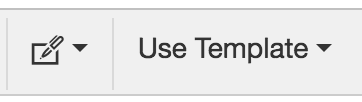
- An updated rich text editor – emails, templates and signatures all have a new, more intuitive editor that allows you to add pictures, tables, colours and more. Note: selecting signatures and templates is now done within the editor:
- Favourite links – a new account setting allows for an account-wide dropdown of favourite links in the menu bar (for example you could have a shortcut to create a new candidate); get in touch if you’d like some help setting this up
Minor Features & Bugfixes
-
Fixed a bug in the reporting dashboard where reporting activity by stage returned an empty report
-
Added history tooltip to placements (previously the activity history was only visible on workflows pre-placement)
-
Added last interaction list option for hiring managers (identical to the behaviour for candidates)
-
Added a quick-expand link to CVs on candidate profiles – click the double arrows to see an expanded view of the CV
-
Added a delete icon to lists on the lists page – this empties and archives a list
-
Fixed a bug where if a candidate and hiring manager shared an email address, interactions could be posted to the wrong entity
-
Fixed a bug where a subject-less message would (correctly) return an error message but (incorrectly) lose the message content
-
Added a button to save and add another candidate to enable for quicker adding of multiple candidates
-
Added the ability to view an attachment (like in GMail) once uploaded, to check the correct attachment was added
-
Added the ability to set defaults for message template variables – for example, writing Hey {First Name there} will take the first name of the candidate if it is present, otherwise it would use “there” – this helps build templates that are robust enough to deal with missing data -
Fixed a bug where the acknowledged flag wasn’t cleared on workflows when the date was cleared
-
Moved “view in workflows” to an icon on the workflows section of a profile (this will open all workflows related to the candidate/role/client selected)
-
Improved visibility on list screens (more separation between rows)
- Added the ability to change a workflow owner without moving between stages – just click the initials on a workflow card. Note: depending on the account rules for workflow ownership, this may get reset on the next move